Advanced GIF Manager 2
The native OFX plugin that exports animated GIF, WebP, WebM, APNG & AVIF directly from the Vegas Pro timeline. No external tools. No command line. Just drag, configure, and export.
One-time purchase · Vegas Pro 15+
Native in Timeline
Works as a standard Video Event FX - no round-tripping to external apps
5 Formats, One Click
Export GIF, WebP, WebM, APNG or AVIF, or write all five at once from one capture
Perceptual Quality
OkLab palette, k-means refinement, anti-flicker, Floyd-Steinberg dithering
Live Preview
See the final color reduction in real time, before exporting
A GIF plugin that grew into a full animation & sticker suite
Version 2.0 is the biggest update yet. The same one-click, inside-the-timeline workflow now drives five modern formats and a perceptual color engine built for stickers, emotes and social clips.
From Timeline to GIF in Seconds
Watch a full walkthrough: adding the plugin, configuring settings, and exporting a production-quality animated GIF - all without leaving Vegas Pro.
Creating GIFs from Video Shouldn't Be This Hard
Every video editor has been there. You've just finished a perfect 3-second clip and you need it as an animated GIF - for a client presentation, a social media post, or a Discord reaction. Here's what the current workflow looks like:
- Render the clip from Vegas Pro as a video file (MP4, AVI, etc.)
- Open a separate application - an image editor, a command-line tool, or a web converter
- Import the video, adjust frame rate, resize, tweak colors
- Export as GIF, hope the quality is acceptable, then repeat if it isn't
That's four separate steps across at least two different applications. Every time you change the edit, you start over. There is no live preview. There is no integration with your timeline effects, color grading, or compositing.
Advanced GIF Manager eliminates the entire pipeline. It lives inside your timeline as a native OFX plugin, and version 2.0 exports GIF, WebP, WebM, APNG and AVIF the same way. What you see in the Preview window is what you get in the file.
Everything You Need for Professional Animation Export
Advanced GIF Manager is an OFX plugin that exports animated GIF, WebP, WebM, APNG and AVIF directly from the Vegas Pro timeline - a complete animation and sticker toolkit built into a single, lightweight effect.
5 Export Formats
GIF, animated WebP, WebM (VP9/VP8), APNG and AVIF (AV1) - choose the right format for size, quality or transparency.
OkLab Perceptual Palette
Median-cut in perceptual OkLab space with 2-pass k-means refinement and a 6-bit assignment grid for cleaner, truer color.
3 Dithering Modes
Floyd-Steinberg (classic error-diffusion), Ordered Bayer 4×4 (pattern-based), and Temporal (animated noise).
Anti-Flicker Coherence
Temporal palette coherence keeps static backgrounds rock-steady across frames, eliminating the shimmer typical of per-frame palettes.
Max Edge Quality
One-click anti-aliasing preset that stops straight, high-contrast edges from staircasing when a frame is reduced to GIF's 256-color palette.
Frame Delta Optimization
Only changed pixels are encoded. Unchanged regions become transparent. Saves 30-60% file size automatically.
Multi-Format Export
Capture once, write all five: GIF, WebP, APNG, AVIF and WebM in a single pass, with one shared progress bar.
8-Bit Alpha Transparency
Full 8-bit alpha on WebP, WebM, APNG and AVIF; 1-bit GIF transparency with optional smooth edge handling for stickers and overlays.
Smart Target File Size
Set a KB limit and a quality-aware solver fits the file automatically - for GIF, WebP, WebM and AVIF - trading quality, colours, bitrate, resolution, dithering or frame rate in the order you choose (Balanced, Keep Resolution, Keep Colours or Max Colours), then reports exactly which levers it used.
Save & Load Presets
Store your favorite settings as portable JSON presets and reuse them across projects and machines.
Ping-Pong & Reverse
Boomerang animation, reverse playback, or standard loop - with configurable loop count.
Seamless Crossfade
Seamlessly blend the last frames into the first for a perfectly smooth infinite loop.
Speed, Ease & Auto-Crop
Speed multiplier (0.1×-10×) with ease curves, plus automatic detection and trimming of static borders.
Resolution & Frame-Rate Control
Set exact output width, height and frame rate (1-60 fps), with aspect-ratio lock and a pixel-art mode for crisp sprite-sheet scaling.
WYSIWYG Live Preview
The Vegas Preview window uses the same quantizer and dithering as the export, so what you see is exactly what you get - tune colours before writing a single file.
Clean, Organized Parameter Controls
Every setting is grouped logically: Master, Resolution & Framing, Animation & Looping, Codec Settings, Color & Palette, Transparency & Matte, File Size Optimization and Export Targets. The interface is familiar to any Vegas Pro user - it's a standard Video Event FX panel.
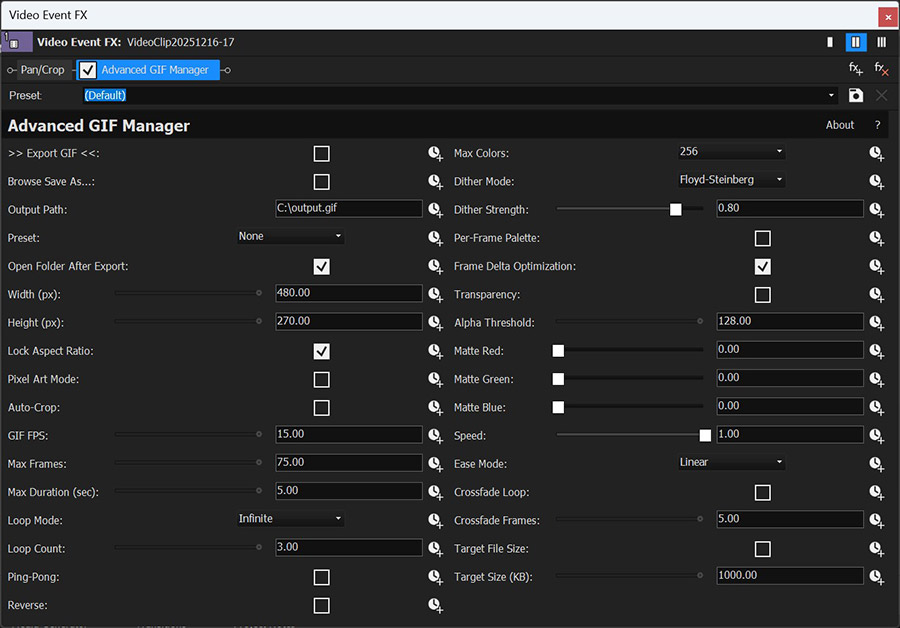


Five Formats, One Timeline
Pick the right format for the job, or export all five at once from a single capture. Every format is written by a self-contained encoder, with no external tools required.
| Format | Transparency | Typical Size | Best For |
|---|---|---|---|
| GIF | 1-bit | Largest | Maximum compatibility, classic reactions |
| Animated WebP | 8-bit alpha | Small | Social posts, WhatsApp stickers |
| AVIF (AV1) | 8-bit alpha | Smallest | Best-in-class compression, modern web |
| WebM (VP9/VP8) | Alpha channel | Small | Telegram video stickers, short clips |
| APNG | 8-bit alpha | Medium | Discord stickers, lossless animation |
4 Steps. Zero External Tools.
From timeline to finished file without ever leaving your video editor.
Add the Plugin
Apply "Advanced GIF Manager" as a Video Event FX on any clip
Set Parameters
Choose format, size, FPS, duration, colors, dithering, and output path
Preview Live
See the color reduction in the Vegas Pro Preview window in real time
Export
Click "Export Media" - a progress window shows encoding and lets you cancel
Export Targets
One capture, every format. Set Export Targets Mode to "All Formats" and the plugin re-encodes the same captured frames to GIF, WebP, APNG, AVIF and WebM in a single pass. They share your filename and differ only by extension, so one export covers every format you might need.
GIF
.gif · universal
WebP
.webp · animated, alpha
APNG
.png · lossless, alpha
AVIF
.avif · AV1, alpha
WebM
.webm · VP9/VP8, alpha
How Does It Compare?
Unlike render-time encoders, Advanced GIF Manager captures a single timeline event and gives you sticker-grade GIF and WebP control - with no separate render or export app. Here's how the common alternatives compare.
| Feature | Advanced GIF Manager | NLE Render Plugin (paid, ffmpeg-based) |
Image Editor (subscription) |
CLI Converter (free) |
Web Service (free) |
|---|---|---|---|---|---|
| Exports GIF, WebP, WebM, APNG & AVIF | ✔ All 5 | ● Via ffmpeg | ● Some | ● Via flags | ● Some |
| Perceptual OkLab palette | ✔ Yes | ✘ No | ✘ No | ✘ No | ✘ No |
| Per-event capture (no full render) | ✔ Single event | ● Whole project | ✘ No | ✘ No | ✘ No |
| Live color preview | ✔ Yes | ✘ No | ● Slow | ✘ No | ✘ No |
| No extra render step | ✔ Yes | ✘ Is the render step | ✘ Render first | ✘ Render first | ✘ Render + upload |
| Uses NLE color grading / FX | ✔ Automatic | ✔ Yes | ✘ Manual re-apply | ✘ Manual re-apply | ✘ No |
| Frame delta optimization | ✔ Built-in | ● ffmpeg flags | ✘ No | ● Via flags | ✔ Yes |
| 8-bit alpha / WebM alpha | ✔ Yes | ✔ Yes | ● Limited | ● Via flags | ✘ No |
| Multi-format export | ✔ One capture, all 5 formats | ✘ No | ✘ No | ● Scripting | ✘ No |
| Auto target file size | ✔ Yes | ● Bitrate only | ✘ Manual | ✘ Manual | ✔ Yes |
| Speed / Ease curves | ✔ Built-in | ● Timeline only | ● Timeline only | ● Via filters | ✘ No |
| Crossfade loop | ✔ Built-in | ✘ Manual | ✘ Manual | ✘ Manual scripting | ✘ No |
| Price | $39.95 once | Paid (one-time or subscription) | Subscription required | Free | Free |
| Ease of use | ✔ GUI in NLE | ● Encoder setup | ● Complex | ✘ Command line | ✔ Web UI |
Comparison reflects typical tool categories, not specific products; feature sets vary by version and vendor.
"Render-time encoders convert your whole project with generic settings. Advanced GIF Manager captures a single event and adds perceptual palettes, multi-format export and target-size control, without a separate render or conversion app."
Ready to Simplify Your Animation Workflow?
One plugin. One purchase. Unlimited GIF, WebP, WebM, APNG and AVIF from your timeline.
$39.95
14-day refund policy · Secure payment via PayPal, Card & Google Pay
Under the Hood
8/16/32-bit float input supported
Changelog
- Four new export formats join GIF: animated WebP, WebM (VP9/VP8), APNG and AVIF (AV1).
- Perceptual OkLab palette with k-means refinement and anti-flicker temporal coherence for cleaner, steadier color.
- 8-bit alpha transparency on WebP, WebM, APNG and AVIF for crisp stickers and emotes.
- One-click multi-format export: a single capture writes GIF, WebP, APNG, AVIF and WebM at once.
- Smart Target File Size solver now fits GIF, WebP, WebM and AVIF to any upload limit, with a Quality Priority control (Balanced, Keep Resolution, Keep Colours, Max Colours).
- Save & load presets as portable JSON files; progress window with Cancel and multithreaded encoding.
- 32-bit float input support for high-bit-depth Vegas Pro projects.
- One-click animated GIF export directly from the Vegas Pro timeline with a live WYSIWYG preview.
Update policy: every 2.x update is a free download for version 2 owners. Upgrading to a future major version (for example 3.x) is a separate paid upgrade - never a subscription.
Install in Under 60 Seconds
No installer required. Just extract the archive and copy one folder.
-
Download the plugin archive (.zip) after purchase and extract
it. Inside you will find the folder
AT_AdvancedGIFManager.ofx.bundle. -
Copy the entire folder
AT_AdvancedGIFManager.ofx.bundleinto the OFX Plugins directory:
C:\Program Files\Common Files\OFX\Plugins\
You will need administrator permissions to write to Program Files. -
Verify the final path looks like this:
C:\Program Files\Common Files\OFX\Plugins\AT_AdvancedGIFManager.ofx.bundle\Contents\Win64\AT_AdvancedGIFManager.ofx - Restart Vegas Pro. The plugin loads at startup.
-
Open a project, select a video event, click the Video Event FX button, and
search for Advanced GIF Manager (listed as
AT_AdvancedGIFManager) in the AlesTempleFX category.
Tip: If the plugin does not appear, make sure you copied the entire
AT_AdvancedGIFManager.ofx.bundle folder (not just the .ofx file). The required
structure is: AT_AdvancedGIFManager.ofx.bundle\Contents\Win64\AT_AdvancedGIFManager.ofx
Create Your First GIF in 30 Seconds
Here's a real-world example. You have a 10-second clip on the Vegas Pro timeline, and you want a 3-second looping GIF at 15 FPS for Twitter.
New to the process? Our illustrated, step-by-step tutorial walks through every setting with examples: How to Make a GIF in Vegas Pro.
- Apply the plugin to the video event as a Video Event FX.
- Set the format, size and FPS - for example GIF, 506px wide, 15 FPS.
- Set Duration (sec) to 3 seconds. Max Frames auto-calculates to 45.
- Move the timeline cursor to the frame where you want the GIF to start.
- Click Browse Save As and choose a location for the output file.
- Click "Export Media". A progress window shows encoding and lets you cancel.
- The output folder opens automatically - your file is ready to upload.
Auto-Linked Parameters
Three animation parameters are automatically synchronized:
- Change Frame Rate (FPS) or Duration (sec) → Max Frames updates automatically
- Change Max Frames → Duration (sec) updates automatically
You never have to do the math. Set any two, and the third adjusts itself.
Deep Dive: Dithering, Transparency & Optimization
A closer look at the quality controls and how they affect the final output.
Did you know? GIF was introduced by CompuServe in 1987 and is nearly 40 years old, yet its 256-color limit has never changed. The trick to a modern-looking GIF is not more colors - it is choosing the right 256 in a perceptual space, which is exactly what the OkLab engine does.
The plugin ships with three dithering algorithms - each suited to a different look. Floyd-Steinberg produces the smoothest gradients and is the best all-round choice. Ordered Bayer 4×4 adds a visible crosshatch pattern that works well for retro or pixel-art aesthetics. And when dithering is disabled, you get flat color bands - useful for graphics with hard edges.
Max Edge Quality (Anti-Aliasing) is a one-click preset that keeps straight, high-contrast edges from "staircasing" when a full-color frame is reduced to GIF's 256-color palette. It enables Per-Frame Palette, Max Quality and strong Floyd-Steinberg together, and the global-palette histogram now samples the clip far more densely so the thin anti-aliased pixels along an edge keep their own palette slots instead of being dropped. Files are larger and encoding is slower; for pixel-perfect edges, export a true-color format (WebP, APNG, AVIF or WebM), which has no palette limit.
Transparency is fully supported: apply a Chroma Keyer (or any alpha-generating effect) before Advanced GIF Manager in the FX chain, enable the Alpha Transparency checkbox, and the resulting file will include an alpha channel. For full 8-bit alpha, export to WebP, APNG, AVIF or WebM; GIF uses 1-bit transparency with optional smooth edge handling.




Learn how to get the best results
Short, illustrated walkthroughs that help you get professional output on day one.
-
How to make a GIF in Vegas Pro (2026 guide)
The full timeline-to-GIF workflow, with every setting explained.
-
Transparent GIFs & stickers
Clean alpha edges with WebP, WebM, APNG and AVIF for Telegram, Discord and WhatsApp.
-
Smaller files, better quality
Hit a size limit without wrecking the image - palette, dithering and format tips.
-
Settings for Discord, Telegram & Twitch
Ready-to-use dimensions, FPS and formats for each platform.
Frequently Asked Questions
Advanced GIF Manager works with Vegas Pro 15 and all later versions, including the current Vegas Pro 2027. It is built to the OFX 1.4 standard and is developed and tested for Vegas Pro. Other OFX hosts are not officially supported yet.
GIF is limited to 256 colors, which can collapse the thin anti-aliased band along straight, high-contrast edges and leave a "staircase." Enable Max Edge Quality (Anti-Aliasing) for the final export - it combines Per-Frame Palette, Max Quality and strong Floyd-Steinberg to preserve those edge pixels, and make sure Pixel-Art Mode is off. For pixel-perfect edges, export WebP, WebM or AVIF instead, which are true-color and have no palette limit.
Advanced GIF Manager 2.0 exports animated GIF, WebP, WebM (VP9/VP8 with alpha), APNG and AVIF (AV1) directly from the timeline. WebP, WebM, APNG and AVIF support full 8-bit transparency for high-quality stickers.
No. The plugin contains complete, self-built encoders for every format. No external encoders, command-line tools, or additional software of any kind is needed.
Yes. It exports the formats these platforms expect - WebP and APNG for stickers, VP9 WebM for Telegram video stickers - and lets you set the exact size, frame rate and file-size limit for each one.
Up to 3840×2160 (4K) resolution, 1800 frames and 60 FPS. In practice most stickers and GIFs are 320-512px wide at 10-15 FPS, which produces files suitable for any platform.
Yes. Enable transparency and the plugin outputs frames with an alpha channel. For high-quality 8-bit alpha, choose WebP, APNG, AVIF or WebM; GIF uses 1-bit transparency with optional smooth edge handling.
From the current position of the timeline cursor (playhead). Place it at the exact frame where you want the animation to begin, then export.
Yes, completely. The plugin reads the composited output of the video event, including all effects, transitions and color grading applied before it in the FX chain.
There is no free trial. However, we offer a 14-day refund window if the plugin is defective, doesn't work as described, or a technical issue prevents you from using it. Email info@alestemple.net within 14 days of purchase with your order details and a description of the issue. Full terms at alestemple.net/refund-policy.html.
Yes, within each major version. Buying version 2 includes all free updates across the 2.x release line. Upgrading to a new major version - for example from v1 to v2, or a future 3.x - is a separate paid upgrade, not a free update. No subscription.
Yes. Our illustrated guide, How to Make a GIF in Vegas Pro, walks through the full workflow - choosing a format, dialing in palette and dithering, and exporting ready-to-upload stickers for Discord, Telegram, Twitch and more.
The license is per-user. You can install it on all the machines you personally use for editing.
Export GIF, WebP & AVIF. From Your Timeline. Today.
Join editors who export GIF, WebP, WebM, APNG and AVIF straight from the Vegas Pro timeline - with live palette preview and target file size.
Buy Now - $39.95One-time purchase · Vegas Pro 15+