Advanced GIF Manager
The first and only native OFX plugin that renders animated GIF files directly from the VEGAS Pro timeline. No external tools. No command line. Just drag, configure, and export.
One-time purchase · Lifetime updates · VEGAS Pro 15 – 23+
Native in Timeline
Works as a standard Video Event FX — no round-tripping to external apps
One-Click Export
Set parameters, enable Export, done. GIF file saved instantly
Studio Quality
Median-cut quantization, Floyd-Steinberg dithering, frame delta optimization
Live Preview
See the final GIF color reduction in real time, before exporting
From Timeline to GIF in Seconds
Watch a full walkthrough: adding the plugin, configuring settings, and exporting a production-quality animated GIF — all without leaving VEGAS Pro.
Creating GIFs from Video Shouldn't Be This Hard
Every video editor has been there. You've just finished a perfect 3-second clip and you need it as an animated GIF — for a client presentation, a social media post, or a Discord reaction. Here's what the current workflow looks like:
- Render the clip from VEGAS Pro as a video file (MP4, AVI, etc.)
- Open a separate application — Photoshop, FFmpeg, Ezgif, ScreenToGif, or a web uploader
- Import the video, adjust frame rate, resize, tweak colors
- Export as GIF, hope the quality is acceptable, then repeat if it isn't
That's four separate steps across at least two different applications. Every time you change the edit, you start over. There is no live preview. There is no integration with your timeline effects, color grading, or compositing.
Advanced GIF Manager eliminates the entire pipeline. It lives inside your timeline as a native OFX plugin. What you see in the Preview window is what you get in the GIF file.
Everything You Need for Professional GIF Export
A complete GIF production toolkit built into a single, lightweight OFX effect.
Median-Cut Quantization
Optimal 2–256 color palette computed per-frame or globally. 5-bit histogram with 32K lookup table for speed.
3 Dithering Modes
Floyd-Steinberg (classic error-diffusion), Ordered Bayer 8×8 (pattern-based), and Temporal (animated noise).
Frame Delta Optimization
Only changed pixels are encoded. Unchanged regions become transparent. Saves 30–60% file size automatically.
Ping-Pong & Reverse
Boomerang animation, reverse playback, or standard loop — with configurable loop count.
Crossfade Loop
Seamlessly blend the last frames into the first for a perfectly smooth infinite loop.
Speed & Ease Curves
Speed multiplier (0.25×–4×) with ease-in, ease-out, and ease-in-out timing curves.
GIF Transparency
Alpha threshold with customizable matte color. Create transparent GIFs for overlays and stickers.
Target File Size
Set a KB limit and the plugin auto-optimizes colors and dimensions to hit it. Perfect for platform upload limits.
Auto-Crop
Automatically detects and removes static borders around your animation — no manual cropping needed.
Clean, Organized Parameter Controls
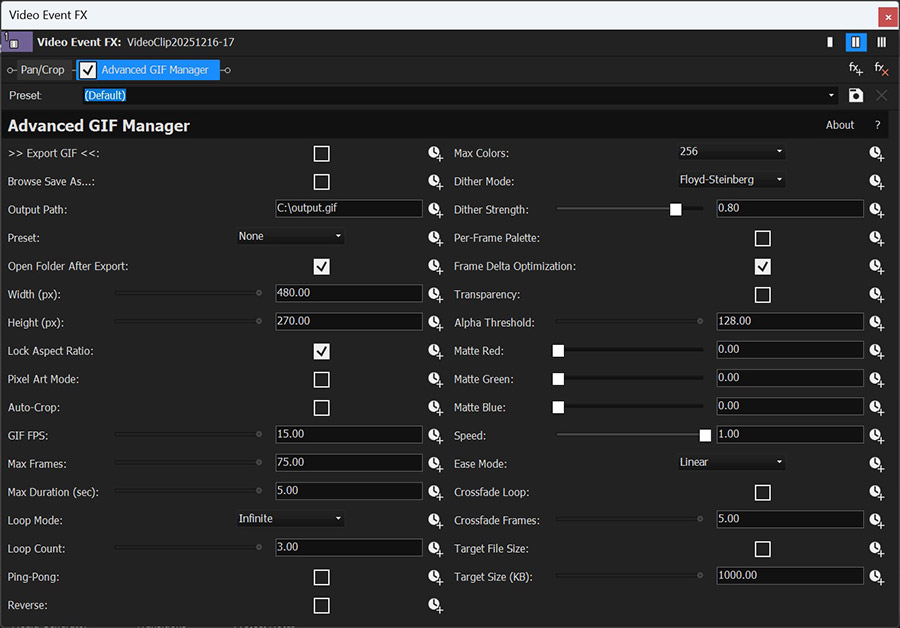
Every setting is grouped logically: Output, Size, Animation, Quality, Transparency, Speed, Crossfade, and Target Size. The interface is familiar to any VEGAS Pro user — it's a standard Video Event FX panel.


4 Steps. Zero External Tools.
From timeline to finished GIF without ever leaving your video editor.
Add the Plugin
Apply "Advanced GIF Manager" as a Video Event FX on any clip
Set Parameters
Choose size, FPS, duration, colors, dithering, and output path
Preview Live
See the GIF color reduction in the VEGAS Preview window in real time
Export
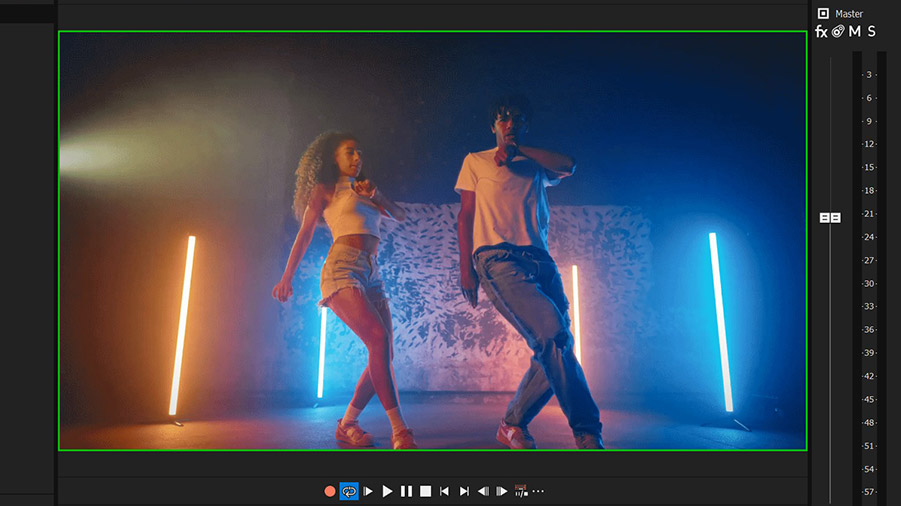
Enable "Export GIF" — green border confirms success. File is ready.
Optimized for Every Platform
One click applies the right resolution, frame rate, and file size limit for the platform you're targeting.
Twitter / X
512px · 15 FPS · 15 MB limit
Frame delta ON
Discord
400px · 15 FPS · 10 MB limit
Frame delta ON
Telegram
320px · 12 FPS · 5 MB limit
Frame delta ON
How Does It Compare?
There is no other OFX plugin that exports GIF files natively from the timeline. Here's how the alternatives stack up.
| Feature | Advanced GIF Manager | Photoshop | FFmpeg (CLI) | Ezgif (Web) |
|---|---|---|---|---|
| Works inside NLE timeline | ✔ Yes | ✘ No | ✘ No | ✘ No |
| Live color preview | ✔ Yes | ● Slow | ✘ No | ✘ No |
| No extra render step | ✔ Yes | ✘ Render first | ✘ Render first | ✘ Render + upload |
| Uses NLE color grading / FX | ✔ Automatic | ✘ Manual re-apply | ✘ Manual re-apply | ✘ No |
| Frame delta optimization | ✔ Built-in | ✘ No | ● Via flags | ✔ Yes |
| Auto target file size | ✔ Yes | ✘ Manual | ✘ Manual | ✔ Yes |
| Speed / Ease curves | ✔ Built-in | ● Timeline only | ● Via filters | ✘ No |
| Crossfade loop | ✔ Built-in | ✘ Manual | ✘ Manual scripting | ✘ No |
| Social media presets | ✔ Twitter, Discord, Telegram | ✘ No | ✘ No | ● Manual |
| Price | $29.95 once | $22.99/mo | Free (CLI) | Free (limited) |
| Ease of use | ✔ GUI in NLE | ● Complex | ✘ Command line | ✔ Web UI |
"Every other method requires you to leave your editor, render an intermediate file, and start a separate conversion process. Advanced GIF Manager is the only solution that keeps your entire GIF workflow inside the timeline."
Ready to Simplify Your GIF Workflow?
One plugin. One purchase. Unlimited GIFs from your timeline.
$29.95
Secure payment via PayPal · Lifetime updates included
Under the Hood
Install in Under 60 Seconds
No installer required. Just extract the archive and copy one folder.
-
Download the plugin archive (.zip) after purchase and extract
it. Inside you will find the folder
AdvancedGIFManager.ofx.bundle. -
Copy the entire folder
AdvancedGIFManager.ofx.bundleinto the OFX Plugins directory:
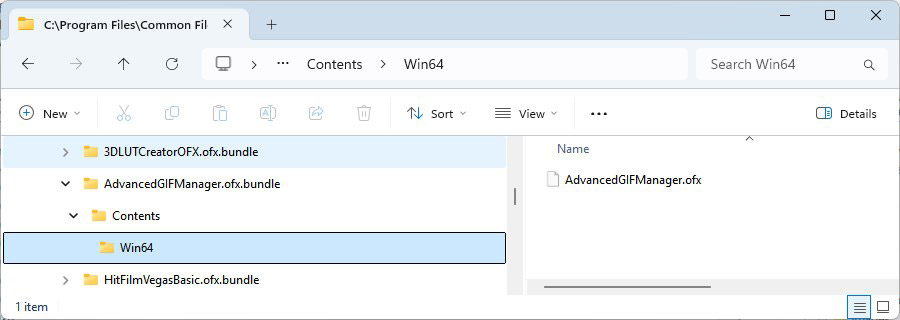
C:\Program Files\Common Files\OFX\Plugins\
You will need administrator permissions to write to Program Files. -
Verify the final path looks like this:
C:\Program Files\Common Files\OFX\Plugins\AdvancedGIFManager.ofx.bundle\Contents\Win64\AdvancedGIFManager.ofx - Restart VEGAS Pro (or your OFX host). The plugin loads at startup.
- Open a project, select a video event, click the Video Event FX button, and search for "Advanced GIF Manager" in the Utility category.
Tip: If the plugin does not appear, make sure you copied the entire
AdvancedGIFManager.ofx.bundle folder (not just the .ofx file). The required
structure is: AdvancedGIFManager.ofx.bundle\Contents\Win64\AdvancedGIFManager.ofx
Create Your First GIF in 30 Seconds
Here's a real-world example. You have a 10-second clip on the VEGAS Pro timeline, and you want a 3-second looping GIF at 15 FPS for Twitter.
- Apply the plugin to the video event as a Video Event FX.
- Select the Twitter preset (512px, 15 FPS, 15 MB limit) — or set values manually.
- Set Max Duration to 3 seconds. Max Frames auto-calculates to 45.
- Move the timeline cursor to the frame where you want the GIF to start.
- Click Browse Save As and choose a location for the output file.
- Turn on ">> Export GIF <<". A green border in the Preview window confirms success.
- The output folder opens automatically — your GIF is ready to upload.
Auto-Linked Parameters
Three animation parameters are automatically synchronized:
- Change GIF FPS or Max Duration → Max Frames updates automatically
- Change Max Frames → Max Duration updates automatically
You never have to do the math. Set any two, and the third adjusts itself.
Deep Dive: Dithering, Transparency & Optimization
A closer look at the quality controls and how they affect the final output.
The plugin ships with three dithering algorithms — each suited to a different look. Floyd-Steinberg produces the smoothest gradients and is the best all-round choice. Ordered Bayer 8×8 adds a visible crosshatch pattern that works well for retro or pixel-art aesthetics. And when dithering is disabled, you get flat color bands — useful for graphics with hard edges.
Transparency is fully supported: apply a Chroma Keyer (or any alpha-generating effect) before Advanced GIF Manager in the FX chain, enable the Transparency checkbox, and the resulting GIF will include an alpha channel.




Frequently Asked Questions
Advanced GIF Manager works with VEGAS Pro 15 and all later versions, including VEGAS Pro 22 and 23. It is a standard OFX 1.4 plugin and should also work in any other OFX-compatible host.
No. The plugin contains a complete, self-built GIF89a encoder with LZW compression. No FFmpeg, ImageMagick, Photoshop, or web service is needed.
Up to 1920×1080 resolution, 500 frames, and 50 FPS. In practice, most GIFs are 320–512px wide at 10–15 FPS, which produces files suitable for any platform.
Yes. Enable the Transparency option, set an alpha threshold, and the plugin will output GIF frames with transparent pixels. You can customize the matte color for edge blending.
From the current position of the timeline cursor (playhead). Place it at the exact frame where you want the animation to begin, then export.
Yes — completely. The plugin reads the composited output of the video event, including all effects, transitions, and color grading applied before it in the FX chain.
Not currently — but the purchase includes a full refund policy and lifetime updates, so you can buy with confidence.
The license is per-user. You can install it on all the machines you personally use for editing.
Export GIFs. From Your Timeline. Today.
Join editors who have simplified their workflow with the only native GIF export plugin for VEGAS Pro.
Buy Now — $29.95One-time payment · Lifetime updates · Secure checkout via PayPal